How to Capture your Screen using Jing

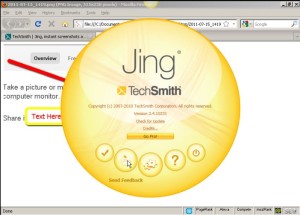
JingDoing tutorials on the web or simply sending out technical instructions to friends and relatives are now made easy using Jing –Techsmith’s free version of their very popular “camtasia”. Other cheaper alternatives to camtasia like camstudio or debut requires specific system requirements, but Jing only requires your system’s capability for .net framework and you’re good to go.

Unlike native software like the windows snipping tool, Jing provides quick upload and sharing of your image or video straight right to it’s sharing platform “screencast”. Once you are done with your capture, you can immediately upload the material to screencast and send the link to your recipients.

So go and get Jing today at Techsmith’s website and enjoy…

Watch this video for more info

Permanent link to this article: http://freewebcoach.org/how-to-capture-your-screen-using-jing/

Best Computer Tune-up Tool: CCleaner Download

(NOTE: Please read the instruction in this article, before using this tool.)

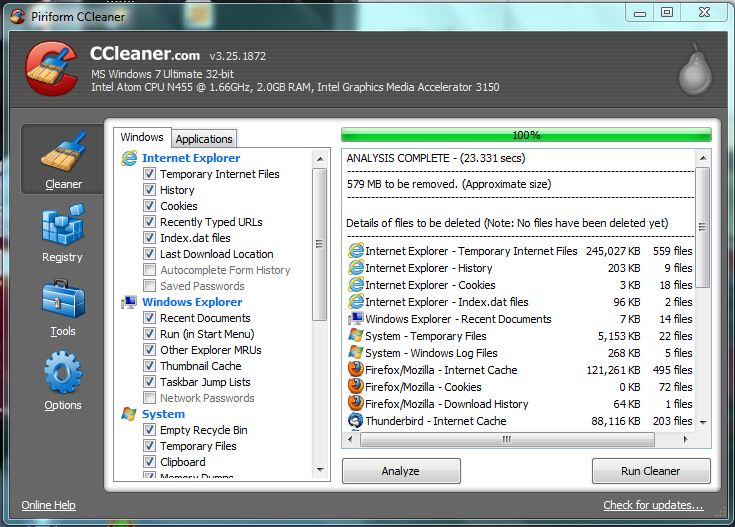
If you are looking for the best computer tune up tool, your search stops with CCleaner. This tool is ultra light weight and really fast… I’ve tried all the so called computer tune up tools until my search ended with CCleaner. My first encounter with this efficient little tool was during my stint with Dell Computers where I worked as a phone tech support fixing and repairing laptops and desktops over the phone. This is the tool that my colleagues recommend… When I tried it, I never looked for any other tool again…

CCleaner is a freeware computer optimizer and cache and cookies cleaner. It removes unused files from your computer, freeing valuable disk space, thus allowing Windows to run faster and. It efficiently cleans traces of your online activities such as your Internet history and cookies. It also contains a fully featured registry cleaner, and the best part is that it’s really fast, normally taking less than a few seconds to run. It instantly removes Spyware and Adware.

Cleaner removes the browsing history (cache) and third party applications such as cookies and ad trackers for most browsers –Internet Explorer, Firefox, Google Chrome, Opera, Safari. It also removes unused data in the Windows recycle Bin, recent documents, temporary files and log files.

Its full featured registry cleaner exceeds all so called registry cleaners out there that does nothing more than get your money…

CCleaner is 100% free, unless if you want a dedicated support hotline and automatic software updates then you have to upgrade to the Pro Version…

CCleaner also allows you to analyze the data in your computer first, before you proceed with actually deleting the unwanted files… For those who are fond of saving passwords in the browsers just like me, you can just click the “applications” tab and uncheck “saved password” so it won’t erase the saved passwords in your browser…

DOWNLOAD CCLEANER FOR WINDOWS!

DOWNLOAD CCLEANER FOR MAC!

Permanent link to this article: http://freewebcoach.org/ccleaner-download/

Free Landing Pages (Minisites)

A landing page or mini site as opposed to a full website is a one page webpage or site that offers information or more often offers information about a product. So in effect the landing page or mini site is a sales page. It is called a landing page because this is the site where people are taken to when they click a banner ad or an affiliate URL. The landing page or mini site can act as your online sales man. The effectiveness of the landing page acting as your online sales man hinges on the text or sales copy written all over the page. For quick insights in writing an effective ad copy, look at this site by one of the world’s leading copy writers (click) –> Copy Writing with John Carlton.

It has been observed that most people do not buy products online the first time they see your sales page. Most internet marketers would have to employ pre-loaded automatic follow up messages through an autoresponder. You need to create webform for this in your autoresponder and prepare follow up messages in the messages tab. To create a webform go HERE. To be able to send the follow up messages, your landing page should of course have a webform –the box that asks for the name and email of the web visitor.

Several online services offer landing page creator software at affordable prices but if you are looking for a quick landing page that is totally FREE, you can go here (click) FREE Landing Page Creator. The site offers complete landing page features plus video guides.

Permanent link to this article: http://freewebcoach.org/free-landing-pages-minisites/

How to Add another Domain to your Hosting Account

Hosting multiple websites on a single hosting account is always preferred if you wish to have a central control panel for all your websites… In some cases, especially websites with features that require a dedicated hosting account, then multiple domains hosted on a single account is not a good idea…

If your hosting account allows for multiple or unlimited domains and you want to add another domain on top of your main domain, here’s how to do it…

First, set the name servers of the domain you wish to add. You can get the name servers from your hosting account somewhere on the lower left…

After you’ve set the name servers, go back to your hosting account and click “add-on domains” in the domains section, and go through the process of filling out the form to add your domain…

The image on the left side of this article should more or less summarize how to fill how the add-on domain page of your hosting account…

The video below may also be helpful…


Permanent link to this article: http://freewebcoach.org/how-to-add-another-domain-to-your-hosting-account/

Domain Forwarding (How to)

There are 2 main reasons why you want to do a Domain Forwarding: 1. Hide a long affiliate URL or any URL for that matter, 2. Shorten a long free hosted website… Whatever the case, domain forwarding is always cool and useful…

The only disadvantage in domain forwarding is that when you click other parts of the website, the address bar URL automatically changes back to the actual URL… So to avoid this, what you want to do is to Mask and Forward all at the same time…

All this can be done in your domain registrar. In your domain registrar account, all you need to do is to select the domain you want to use, and then set the forward function to forward and mask at the same time….

Please watch video below…


Permanent link to this article: http://freewebcoach.org/domain-forwarding-how-to/

You Tube Time Sucking Time

youtubeNever Open YouTube! Yup, that’s on my wall just right beside my computer screen… It’s kind of going against the grain here, for something that’s No.3 worldwide as per Alexa.com ranking today…

alexa you tube ranking

But I’ve really wasted so much time of my life on YouTube already…

Yes you tube has become the source of almost all information you need about anything —everything… You want to read about something? Go to Google or Wikipedia… But if you want to know more –watch the videos in YouTube…

There was a time when audio was king… Anything that had audio had high value in the internet, but people these days respond well to videos… If it’s video, then its high value on the internet today…

I’ve literally ditched my cable TV 3 years ago when I first learned that everything is on YouTube. Even episodes of my childhood favorite TV shows like “Knight Rider” and “Twilight Zone” are on YouTube… My neighbor’s cat is on You Tube… Probably your dad is on you tube… the Pope is on YouTube —everyone is on You Tube! People live on You Tube!

I just wanted to finish reading a book, unfortunately it’s a PDF file so I’m stuck in my computer and the temptation to open a video in between breaks is always there… This is the reason why most offices or workplaces. I guess, install cameras or even software to watch the screen of their employees during work time… You Tube is just addicting, and ranked No. 1 together with Facebook when it comes to stealing peoples’ time.

Yes, you tube is rich in useful information, but when you open one video, it’s just difficult to avoid the temptation of opening another related video… And I don’t want to block You Tube in my computer. I even have a couple of videos in you tube, besides, You Tube is actually my favorite website, but unfortunately for the time being –is also the cause of all the delays in my projects…

Permanent link to this article: http://freewebcoach.org/tube-time-sucking-time/

Older posts «